Skip to pricing
Arakot Render Lab Buy

You set up the camera. The plugin does the render.

Arakot Render Lab turns your 3ds Max and SketchUp model into a render in the same framing, with materials and light.

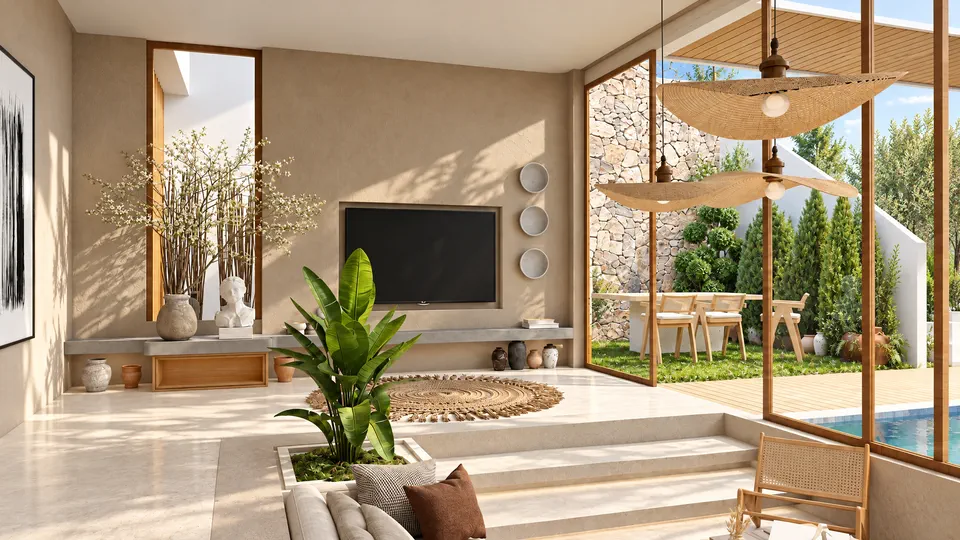
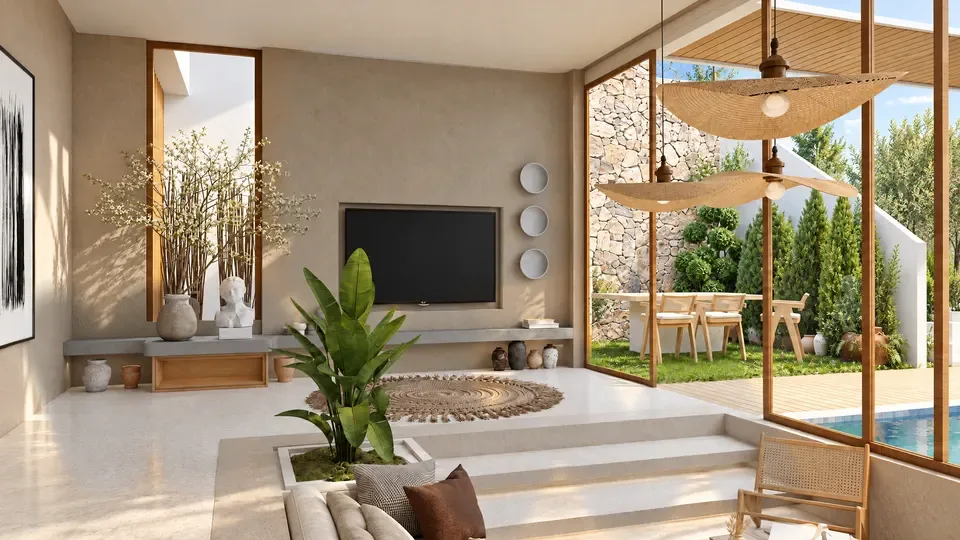
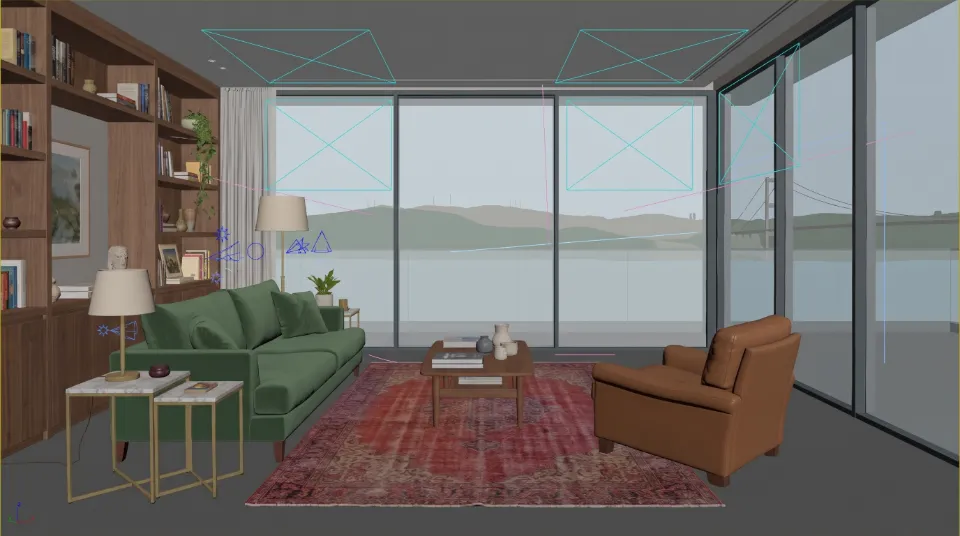
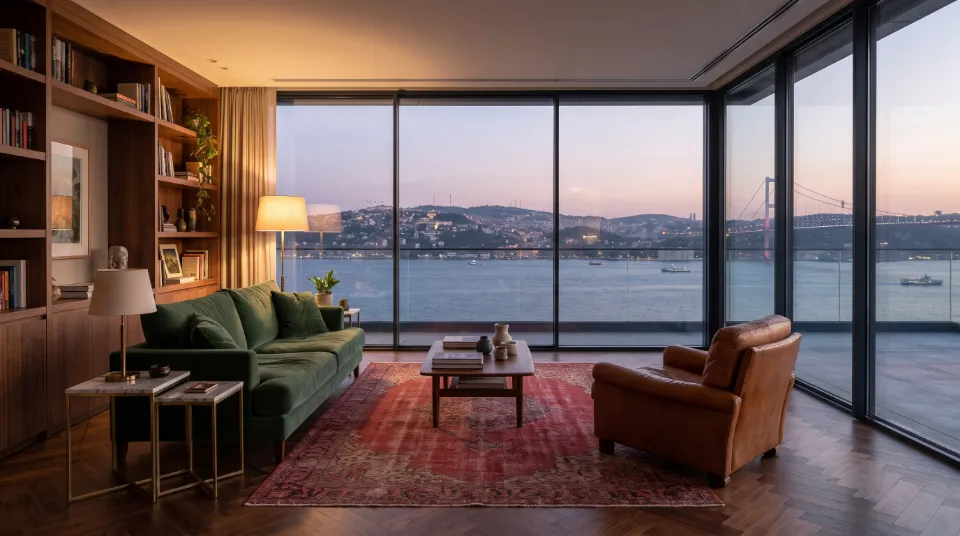
Example scene, Bosphorus-view living room: 3ds Max Viewport Same camera: the render Example scene
Drag the handle: the Viewport on the left, the render on the right.
Source
Viewport, Corona VFB or an image you choose on your computer
Models
Halo, Prizma, Focus
Requires
3ds Max and SketchUp 2023 or later · Windows

How it works

Three things carry a render: model, materials, light.

All three together set the quality of a render: the quality of the model, the quality of the materials and how the light is set up. In Render Lab, you bring only the model.

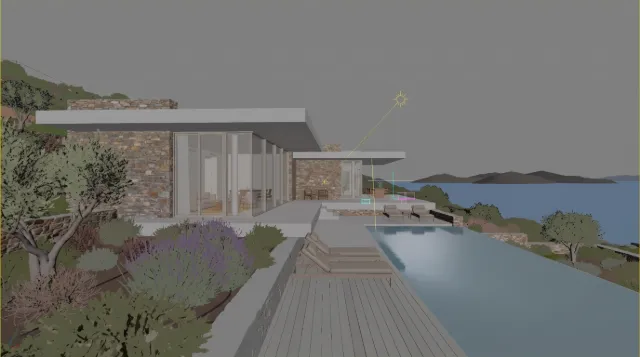
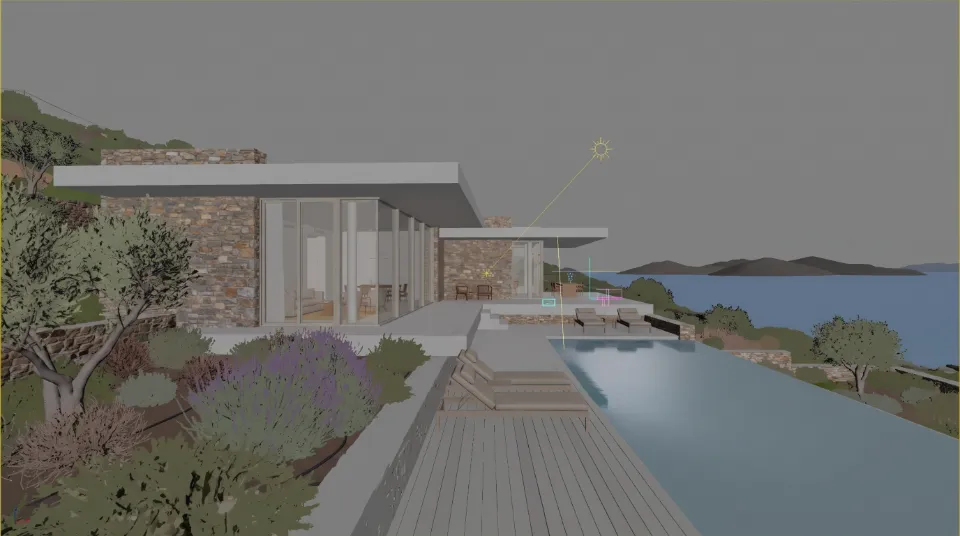
Example scene, hillside villa: 3ds Max Viewport, grey modelExample scene
Model · from you. Your 3ds Max or SketchUp scene
Same camera: materials in place, light not set up yetExample scene
Materials · from the plugin. No need to assign materials
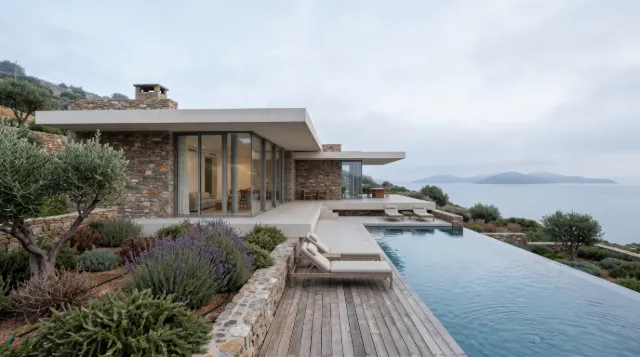
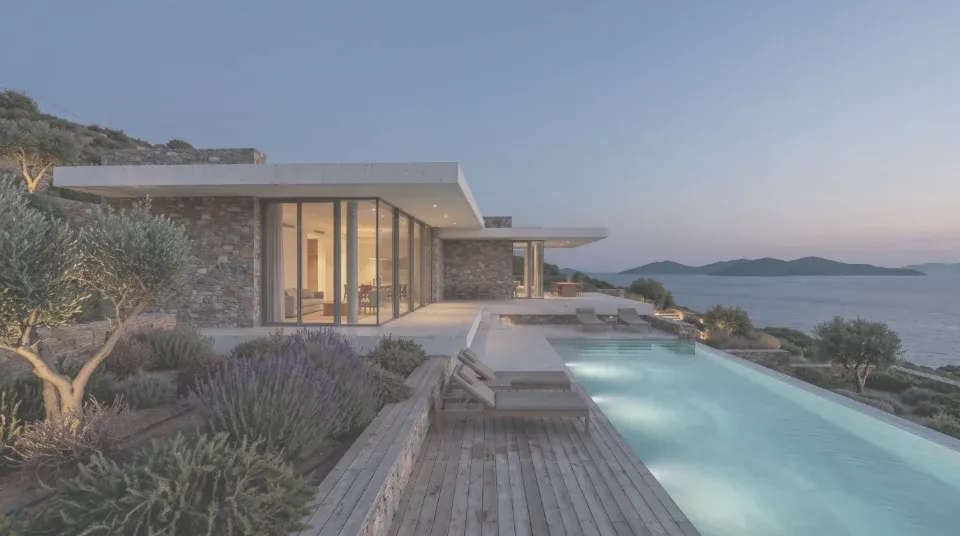
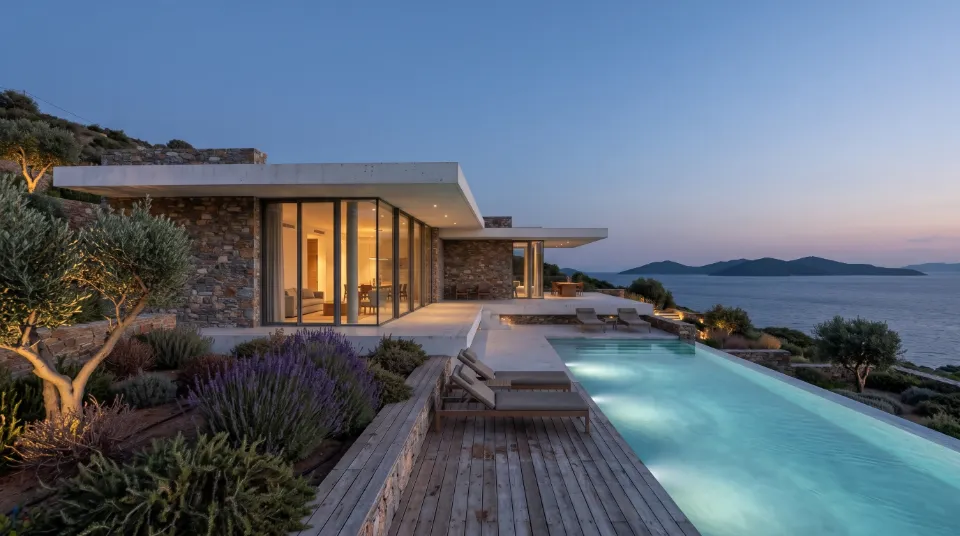
Same camera: render with its light, blue hourExample scene
Light · from the plugin. No need to set up lights

The plugin sets up the materials and light, so you don't have to.

The colours and openings in the Viewport guide the plugin. The framing, geometry and objects stay the same; the result is up to 98.7% consistent with your scene.

The plugin

The camera is ready. No render yet.

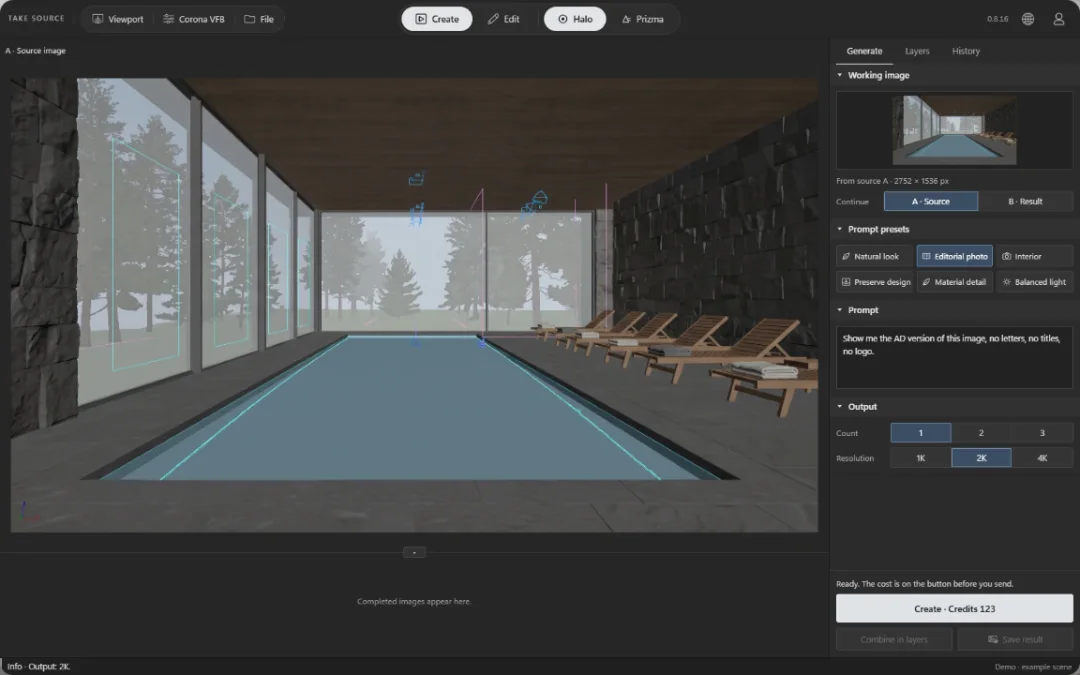
The Arakot Render Lab plugin window: canvas on the left (example scene), panel on the right with the source capture buttons, prompt presets, prompt, output and CreateExample scene
This window is a copy of the plugin running in your browser. As you scroll, it plays the steps for you.

1 Source

Take the source from the Viewport.

Bring the Viewport where you set up the camera into the plugin with one click. You can also take a render from the Corona VFB, or choose an image on your computer and work on an existing render.

Viewport Corona VFB File
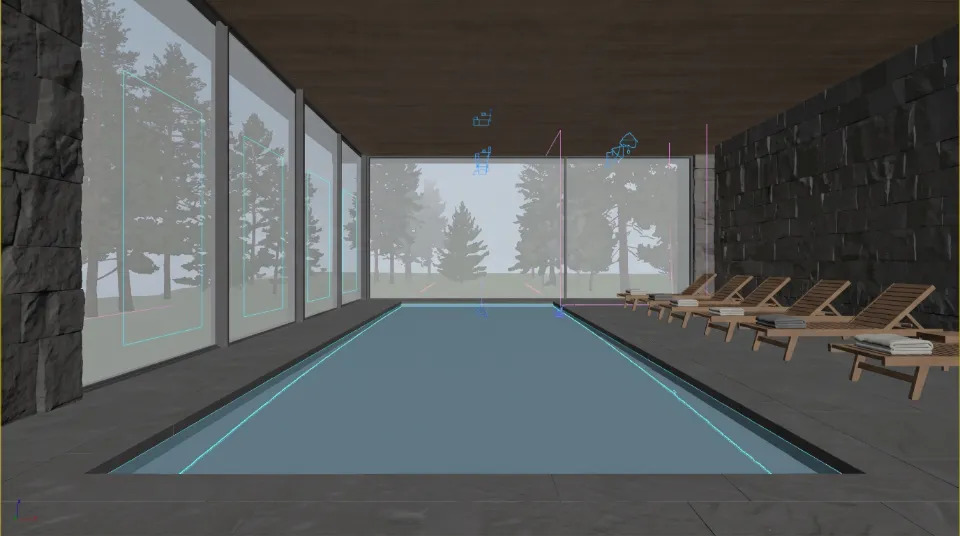
A · Source image
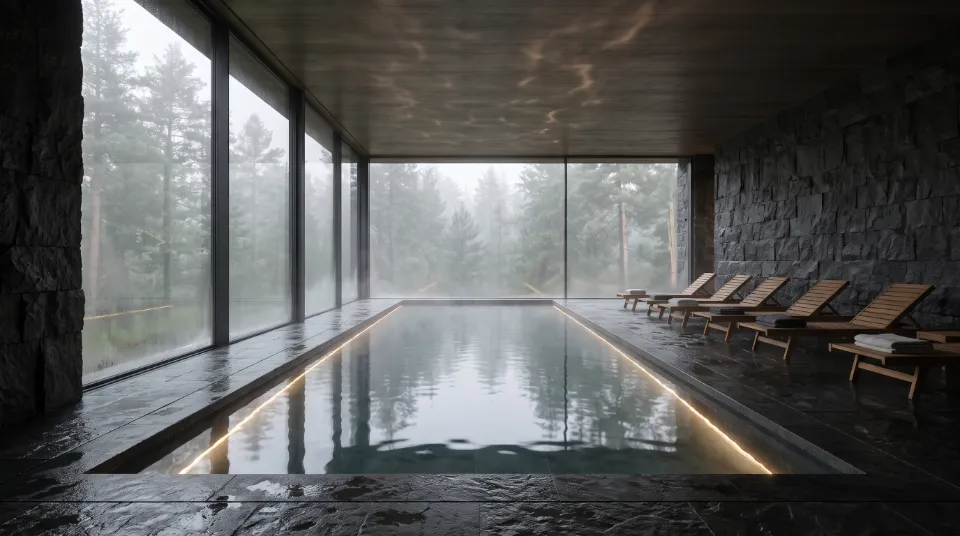
Example scene, hotel spa pool: the source image captured from the Viewport Example scene

Success · Source ready.

2 Prompt

Write what you want.

Choose one of the prompt presets or write your request in your own words. You can also write in Turkish; the plugin translates it before sending.

Prompt presets

Natural look Editorial photo Interior Preserve design Material detail Balanced light

Prompt

Show me the AD version of this image, no letters, no titles, no logo.

3 Size

Choose the size of the render.

Choose 1K, 2K or 4K resolution. Tap below to try it: the credits on the Create button change with each choice; you see the cost before you send.

Output

Count Resolution

Ready. The cost is on the button before you send.

Create · Credits 123

Credits 123 ≈ 12.30 TRY

The parts of a request

The plugin sends them all in one request.

Source
Viewport
Prompt
Editorial photo
Model
Halo
Size
2K

Render

One night left before the presentation.

Request sent. This request costs 123 credits, about 12.30 TRY.

The render is ready. The night is still yours.

Same camera. Now a render. The plugin stays up to 98.7% consistent with your scene: the framing, geometry and objects stay the same.

Hotel spa pool, Viewport view (example scene) Hotel spa pool, render (example scene) Example scene A · ViewportB · Render
Drag the handle: Viewport on the left, result on the right.

Examples

Example scenes.

Swipe sideways; tap a card to see its Viewport.

  • Japandi living room

  • Coffee shop

  • Main bedroom

  • Hillside villa

  • Travertine bathroom

  • Boutique hotel lobby

  • Bosphorus-view living room

  • Cocktail bar

  • Children's room

  • Art gallery

  • Townhouse kitchen

  • Open-plan office

  • Mid-century living room

  • Stone house courtyard

  • Art Deco dining room

  • Hotel spa pool

  • Sea-view bedroom

  • Concert hall

  • Industrial loft

  • Boutique shop

  • Study

  • Residential building, exterior

  • Winter garden

  • Dental clinic

  • Sea-view hotel room

  • Kindergarten classroom

  • Wood-fired restaurant

  • Meeting room

  • Timber cabin in the snow

  • Library reading room

Detail

Another setting, more detail.

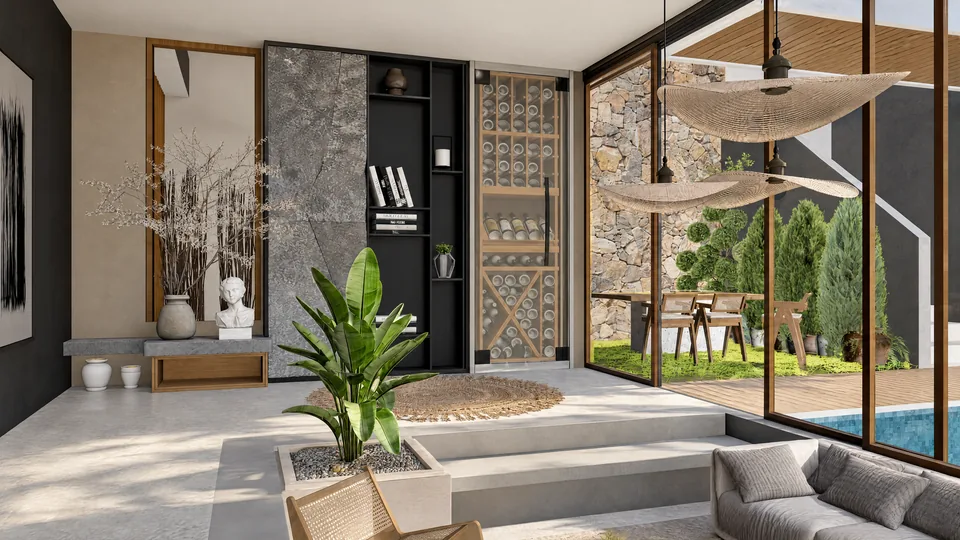
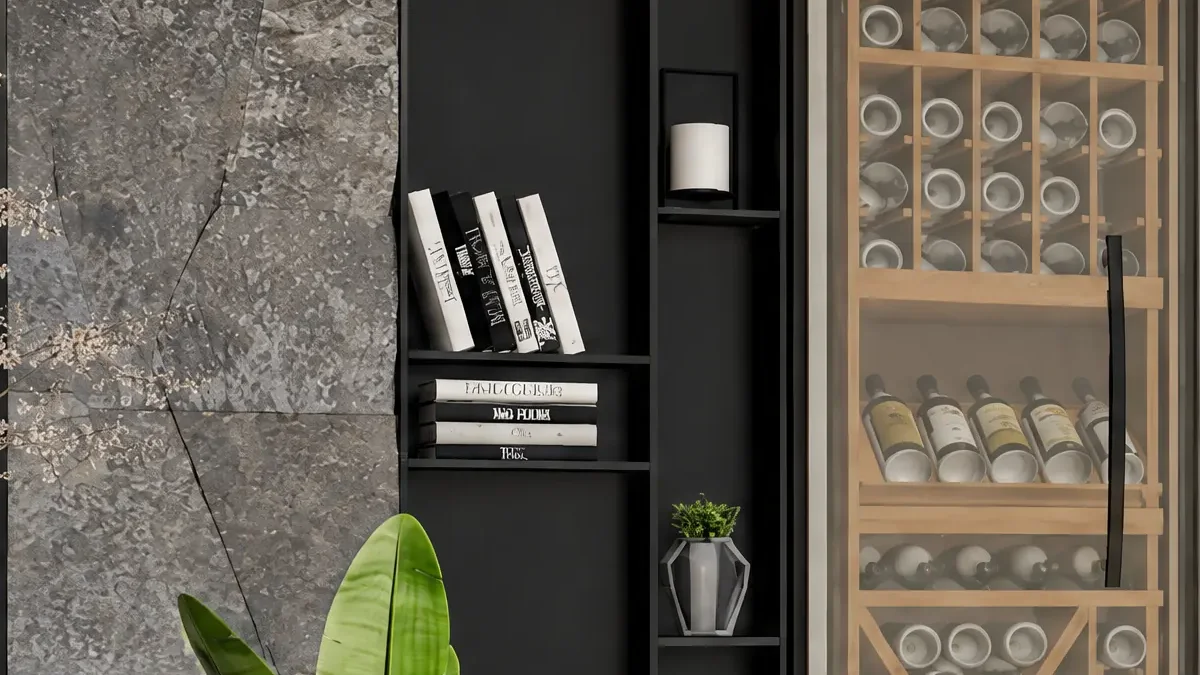
Request the same scene again in 4K with the Balanced light preset. Zoom in and you can see the texture of the materials.

Living room, wine cabinet, Prizma, balanced light, 4K record
Record: Prizma · balanced light, 4K · 3818 × 2148
The framed area of the same record, in the 4K record's own pixels: stone cladding, shelves and the wine cabinet
The framed area, in the 4K record's own pixels.

Editing

Change just one thing.

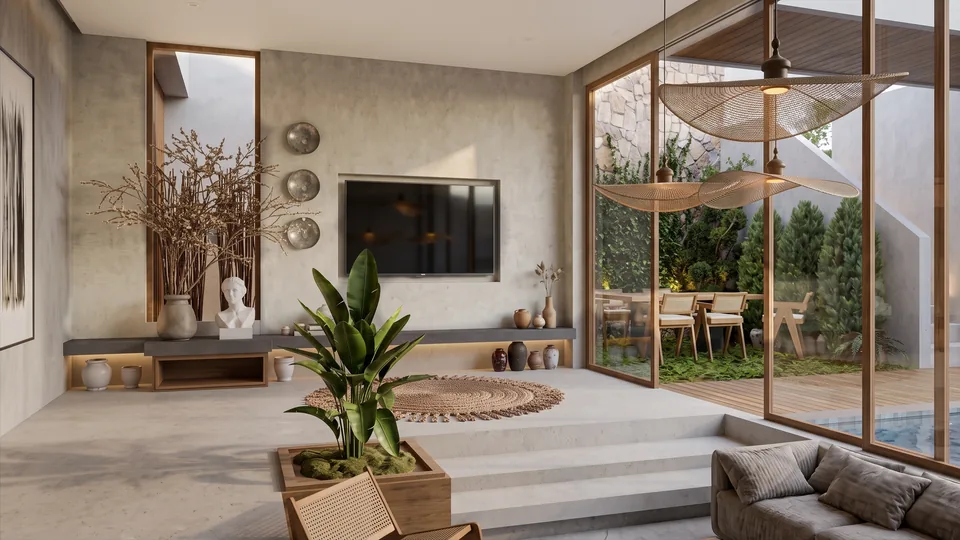
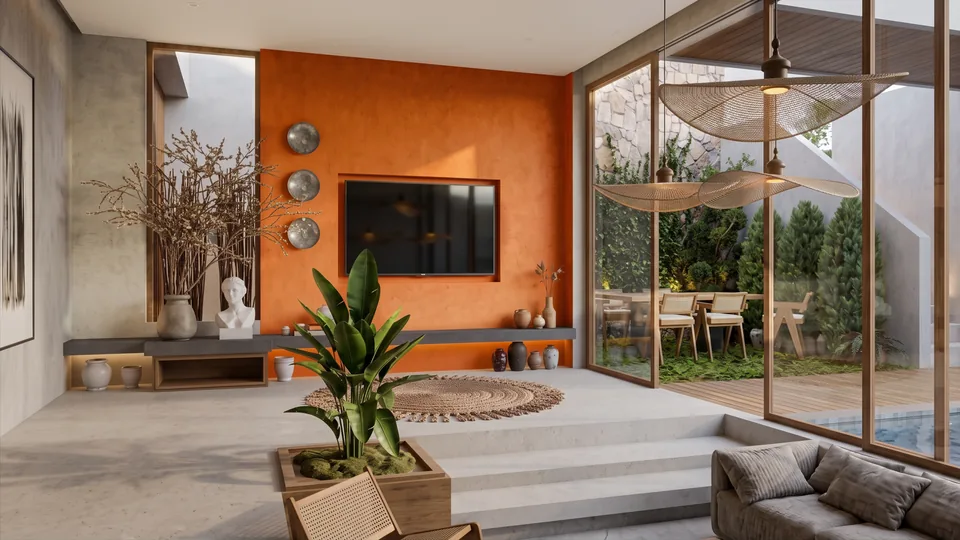
Everything is in place. Only the TV wall is not right.

When a client wants just one area changed, you don't need to generate the whole image again. In Edit mode, tell Focus what should change; 99.9% of the areas you don't change stay the same.

Living room, TV wall, source image Living room, TV wall, Focus result: TV wall in orange plaster A · SourceB · Result
Drag the handle. Record: Focus · TV wall, orange plaster · 2048 × 1151

Same camera, six results.

At the top, the scene's Viewport; below it, six different lights from the same camera. Swipe sideways; tap a result to read the request text.

Hillside villa, Viewport view (example scene) Example scene Viewport
  • Hillside villa, misty morning (example scene) Example scene Misty morningRequest text

    Turn this raw 3ds Max viewport screenshot into a finished photorealistic exterior render. Keep exactly the same camera, lens, framing, perspective, aspect ratio and resolution. Every object must keep exactly the same position, size and outline, so the render lines up with the viewport pixel for pixel. Do not crop, zoom, add, remove or redesign anything. Remove the sun gizmo, the cyan and pink helper lines and the thin yellow viewport border. Materials: local stone walls, thin white concrete slabs, large sliding glass doors, an infinity pool, a timber deck with loungers, olive trees, lavender and wild shrubs, the sea and distant islands. Lighting: a soft misty morning, pale overcast sky, low haze over the sea, cool even daylight, no direct sun. Physically correct global illumination, realistic materials with subtle imperfections, natural colors, no over-saturation, no HDR look, no sunbeams, no lens flare, no bloom. No people, no text, no logos, no watermark.

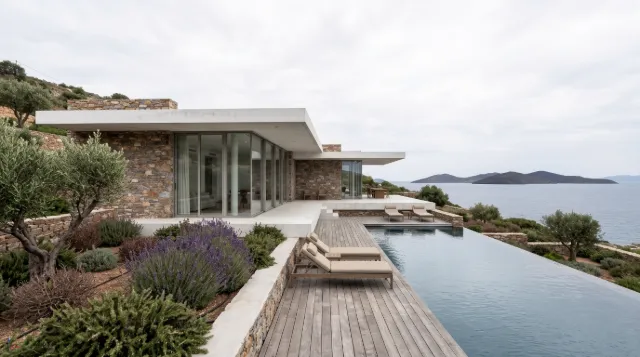
  • Hillside villa, overcast midday (example scene) Example scene Overcast middayRequest text

    Turn this raw 3ds Max viewport screenshot into a finished photorealistic exterior render. Keep exactly the same camera, lens, framing, perspective, aspect ratio and resolution. Every object must keep exactly the same position, size and outline, so the render lines up with the viewport pixel for pixel. Do not crop, zoom, add, remove or redesign anything. Remove the sun gizmo, the cyan and pink helper lines and the thin yellow viewport border. Materials: local stone walls, thin white concrete slabs, large sliding glass doors, an infinity pool, a timber deck with loungers, olive trees, lavender and wild shrubs, the sea and distant islands. Lighting: a bright overcast midday, white cloud cover, soft shadowless daylight, crisp natural colors, no direct sun. Physically correct global illumination, realistic materials with subtle imperfections, natural colors, no over-saturation, no HDR look, no sunbeams, no lens flare, no bloom. No people, no text, no logos, no watermark.

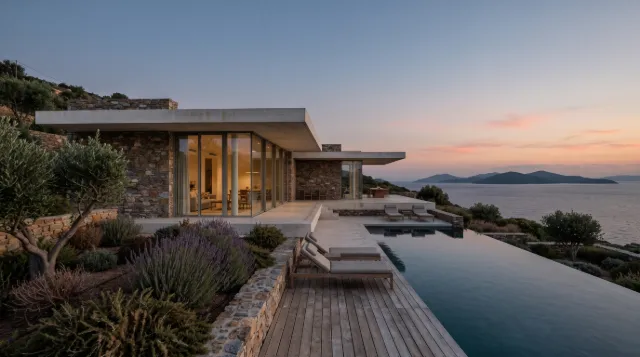
  • Hillside villa, after sunset (example scene) Example scene After sunsetRequest text

    Turn this raw 3ds Max viewport screenshot into a finished photorealistic exterior render. Keep exactly the same camera, lens, framing, perspective, aspect ratio and resolution. Every object must keep exactly the same position, size and outline, so the render lines up with the viewport pixel for pixel. Do not crop, zoom, add, remove or redesign anything. Remove the sun gizmo, the cyan and pink helper lines and the thin yellow viewport border. Materials: local stone walls, thin white concrete slabs, large sliding glass doors, an infinity pool, a timber deck with loungers, olive trees, lavender and wild shrubs, the sea and distant islands. Lighting: early evening just after sunset, a soft warm afterglow in the sky, calm even light, the first interior lights glowing behind the glass, no sun disk. Physically correct global illumination, realistic materials with subtle imperfections, natural colors, no over-saturation, no HDR look, no sunbeams, no lens flare, no bloom. No people, no text, no logos, no watermark.

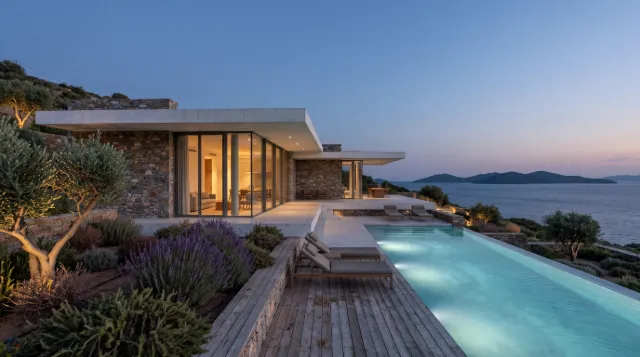
  • Hillside villa, blue hour (example scene) Example scene Blue hourRequest text

    Turn this raw 3ds Max viewport screenshot into a finished photorealistic exterior render. Keep exactly the same camera, lens, framing, perspective, aspect ratio and resolution. Every object must keep exactly the same position, size and outline, so the render lines up with the viewport pixel for pixel. Do not crop, zoom, add, remove or redesign anything. Remove the sun gizmo, the cyan and pink helper lines and the thin yellow viewport border. Materials: local stone walls, thin white concrete slabs, large sliding glass doors, an infinity pool, a timber deck with loungers, olive trees, lavender and wild shrubs, the sea and distant islands. Lighting: blue hour after dusk, a deep blue sky, warm interior lights glowing through the glass, underwater pool lights on, soft garden uplights on the olive trees. Physically correct global illumination, realistic materials with subtle imperfections, natural colors, no over-saturation, no HDR look, no sunbeams, no lens flare, no bloom. No people, no text, no logos, no watermark.

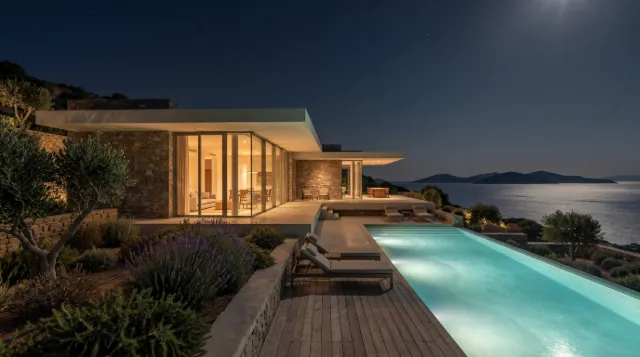
  • Hillside villa, night (example scene) Example scene NightRequest text

    Turn this raw 3ds Max viewport screenshot into a finished photorealistic exterior render. Keep exactly the same camera, lens, framing, perspective, aspect ratio and resolution. Every object must keep exactly the same position, size and outline, so the render lines up with the viewport pixel for pixel. Do not crop, zoom, add, remove or redesign anything. Remove the sun gizmo, the cyan and pink helper lines and the thin yellow viewport border. Materials: local stone walls, thin white concrete slabs, large sliding glass doors, an infinity pool, a timber deck with loungers, olive trees, lavender and wild shrubs, the sea and distant islands. Lighting: night, a dark sky with a few stars, moonlight on the sea, warm interior lights, the pool glowing turquoise, soft garden lighting. Physically correct global illumination, realistic materials with subtle imperfections, natural colors, no over-saturation, no HDR look, no sunbeams, no lens flare, no bloom. No people, no text, no logos, no watermark.

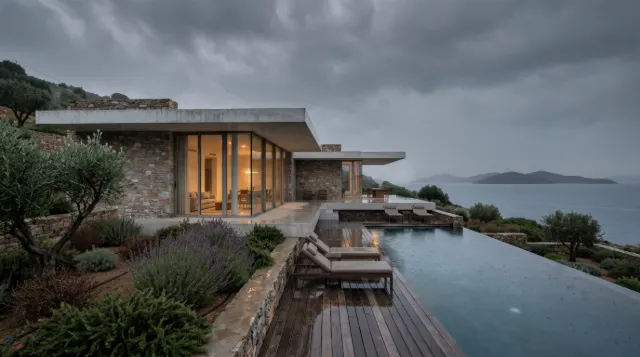
  • Hillside villa, rainy evening (example scene) Example scene Rainy eveningRequest text

    Turn this raw 3ds Max viewport screenshot into a finished photorealistic exterior render. Keep exactly the same camera, lens, framing, perspective, aspect ratio and resolution. Every object must keep exactly the same position, size and outline, so the render lines up with the viewport pixel for pixel. Do not crop, zoom, add, remove or redesign anything. Remove the sun gizmo, the cyan and pink helper lines and the thin yellow viewport border. Materials: local stone walls, thin white concrete slabs, large sliding glass doors, an infinity pool, a timber deck with loungers, olive trees, lavender and wild shrubs, the sea and distant islands. Lighting: a rainy overcast evening, light rain, a wet timber deck and wet stone with soft reflections, a grey sky over the sea, warm interior lights on. Physically correct global illumination, realistic materials with subtle imperfections, natural colors, no over-saturation, no HDR look, no sunbeams, no lens flare, no bloom. No people, no text, no logos, no watermark.

Stack the versions.

Paint with the brush where each version shows. Here the balanced-light version without sun is painted only onto the floor, the TV wall and the steps.

Layer 1: morning sun, pool, Editorial photo Layer 2, masked: the floor, TV wall and steps from the balanced light version Layer 1Layer 2 (masked)
Drag the handle: Layer 1 on the left, masked Layer 2 on the right.
The plugin combines the layers on your computer, so no credits are used.

Credit packs and licence

Two ways: credits or a licence.

Lifetime licence

Access with a one-time payment, for those who have their own AI accounts.

  • With your own API keys
  • AI costs are paid to the service
  • 1 computer, 3ds Max and SketchUp
  • 1 year of updates included
  • Voluntary refund within 7 days

Price1,500 TRY

(about $30 / €27) Paid once, it does not expire.

Coming soon

Get your order code, then pay on iyzico. The download link arrives within 1 business day by email. Approximate amounts at the Central Bank of the Republic of Türkiye rate of 18 November 2026. You pay in Turkish lira.

Credit packs coming soon

No API key needed. The cost of each render is deducted from your credits.

Credit packs: price, credits and approximate number of renders
PriceCreditsApproximate renders
200 TRY2,000 credits≈ 28 renders
500 TRY5,000 credits≈ 72 renders
1,200 TRY12,000 credits≈ 173 renders

Render counts are for Prizma · High · 2K.

Join the waitlist and we will let you know when sales open.

What does a render cost? Prizma · High · 2K, 69 credits per render (≈ 6.90 TRY)

The cost depends on the model, quality and resolution. You see the cost on the Create button before you send.

Prizma · High
1K34 credits≈ 3.40 TRY
2K69 credits≈ 6.90 TRY
4K123 credits≈ 12.30 TRY
Halo
1K42 credits≈ 4.20 TRY
2K123 credits≈ 12.30 TRY
4K184 credits≈ 18.40 TRY
Focus · editing
Medium72 credits≈ 7.20 TRY
High264 credits≈ 26.40 TRY

Amounts are estimates, calculated for a 16:9 source image. Combining layers happens on your computer and uses no credits.

Requirements

What do you need?

Software
3ds Max and SketchUp 2023 or later
Computer
Runs on Windows and needs an internet connection.
AI account
Not needed with credits. With the lifetime licence you enter your own API keys; Turkish prompts also need an OpenAI key.

Creativity is now in your hands.

See pricing

Waitlist

We'll let you know when sales open

Credit packs are coming soon.

Which program will you use it in?
What are you interested in?

You can read how your data is processed in the privacy notice (KVKK).